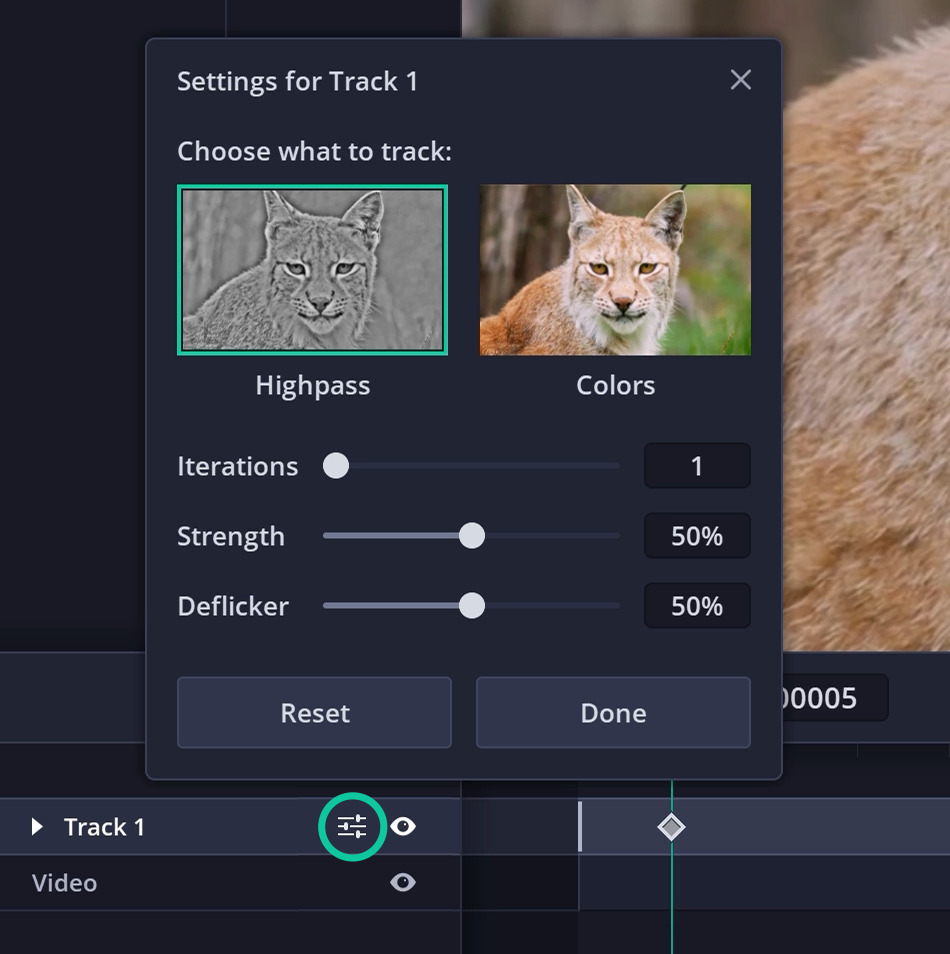
Highpass tracking
For realistic edits
Keeps texture intact, so it's ideal for face retouching, clean-ups, rebranding, and preserving patterns in your keyframe.
Control how your keyframes propagate in each track to get a clean result for your shot. EbSynth renders in real time, so try different settings and see what works best.
For realistic edits
Keeps texture intact, so it's ideal for face retouching, clean-ups, rebranding, and preserving patterns in your keyframe.
For painterly edits
Follows lively motion better. Texture can shimmer, but brushstrokes hide it well, so it's ideal for painterly styles or 2D animation.
How many chances EbSynth gets to fix its own mistakes. Increase if you see it helping. More takes longer and isn't always better.
How closely the keyframe follows the video. Increase it if your character leaves traces in the background.
Keeps each frame close to the previous one. This stops flickering but can create artifacts. Decrease for animation or fast video.
| If you see… | Try |
|---|---|
| Eyes or mouth don't fully close | Colors, Iterations ↑, Deflicker ↓ |
| Characters leave traces in the background | Colors, Iterations ↑, Strength ↑, Deflicker ↓ |
| A fast hand doesn't snap into place | Colors, Iterations ↑, Strength ↑, Deflicker ↓ |
| Texture patterns break up (skin, text, lines) | Highpass |
| Texture is poorly rendered | Iterations ↑ |
| Texture is shimmering | Deflicker ↑ |
We're sorry, EbSynth is only available on desktop devices. Please visit us from a computer to get started.